I have a soft spot for GNOME Calendar. It does one thing, it does it quickly, and it does not ask me to create an account or open a browser tab. I use it as a lightweight calendar, and I genuinely prefer it to Notion Calendar: no workspace, no database, no web app, no subscription, just a local-first calendar that opens and gets out of the way.
The problem was that I use Windows as my daily desktop. GNOME Calendar is a Linux application. For a while I ran it through WSL, first as a normal Linux app and later through WSLg. It worked, but it never felt right. The app itself is light; the runtime around it is not.
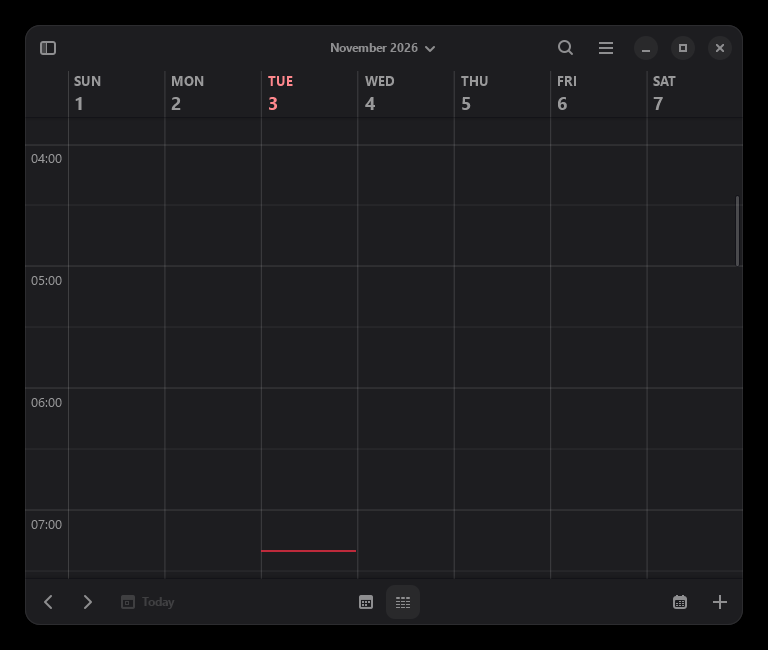
So I did the unreasonable thing: I ported GNOME Calendar to Windows natively.
Why WSL felt slow
WSL is fantastic when the job is Linux tooling. It is less fantastic as the runtime for a small desktop calendar.
Launching GNOME Calendar through WSL meant starting or waking a Linux distribution, bringing up the WSLg display stack, starting the Linux D-Bus session, starting Evolution Data Server, and then starting the app. On a cold start, that is seconds of setup before I see a calendar. Even on a warm start, there is a boundary between Windows and Linux that a native process does not have.
The resource cost is real too. WSL 2 keeps a Linux kernel and a VM alive. For a terminal and a build toolchain, that is a fair trade. For a calendar that I want to glance at and close, it is a lot of operating system to keep around. WSLg adds another layer: the Linux window is projected onto Windows, so taskbar behavior, DPI changes, clipboard, drag and drop, and input methods are all translated rather than native.
I also noticed the filesystem boundary. Anything that touched a Windows path crossed the /mnt/c layer. GNOME Calendar is not a heavy file application, but the general sluggishness of the WSL environment made the whole experience feel heavier than the app actually is.
The conclusion was simple: I liked the application, but I did not like the runtime. If I wanted a lightweight calendar on Windows, it should be a Windows process.
What GNOME Calendar actually needs
GNOME Calendar is open source under the GPL-3.0-or-later. The upstream repository is on GNOME GitLab, and there is a GitHub mirror. The application is built with GTK4 and libadwaita. The calendar data layer is Evolution Data Server (EDS), a set of libraries and D-Bus services that manage calendars, address books, and accounts. The app also uses GSettings, GWeather for the optional weather feature, and GeoClue for location.
That stack is why a native port is more than "compile the app with MinGW". GTK4 has a Windows backend. libadwaita works on Windows. But EDS is a Linux-first service stack, and its Windows support had bit-rotted. The old Evolution Windows port existed years ago and was discontinued. Modern EDS assumes POSIX file metadata, Unix sockets, localtime_r, POSIX regex, and a D-Bus session.
The port therefore had two halves:
- Build EDS for Windows.
- Build GNOME Calendar on top of it, then package the GTK and EDS runtime into a self-contained folder.
I used MSYS2 with the UCRT64 environment and MinGW-w64. MSYS2 already packages GTK4, libadwaita, libsoup3, libical, GWeather, D-Bus, and most of the GNOME platform. It does not package EDS, so EDS had to be built from source.
Fixing Evolution Data Server
The first build failures were exactly the kind of thing you expect from a Linux-first codebase on MinGW:
g_stat()writesstruct _stat64data on Windows, but some code passed a smallerstruct statbuffer. That is not a warning to ignore; it is a buffer overrun. The fix was to useGStatBufforg_stat()and keepstruct statforfstat().- Camel's message port uses sockets. The file included NSPR before
winsock2.h, which caused the Winsock definitions to be skipped. Includingwinsock2.hfirst and linkingws2_32fixed it. - Camel's search code uses POSIX
regcomp()/regexec(). MinGW does not provide those symbols, so I linked MSYS2'slibsystre/libtre. localtime_r()is missing on Windows. A few files needed a fallback based onlocaltime().- CMake's iconv and OAuth helper checks used native Windows paths with backslashes, which broke the generated C source. Forward slashes and the right CMake policy fixed it.
- EDS requires
uuid>=2.0. Windows has UUID generation inrpcrt4.dll, so I wrote a tinylibuuidshim withuuid_generate_random()anduuid_unparse_lower().
Those changes live in a separate fork branch: vasil1729/evolution-data-server:windows-native-port. The full patch is also mirrored in the GNOME Calendar fork at windows/patches/evolution-data-server-windows.patch.
Fixing GNOME Calendar
The application changes were smaller, but one of them was subtle.
GNOME Calendar uses a custom log handler that writes to a Unix stdout GIOChannel. A Windows GUI process does not have a reliable Unix-style stdout. The handler could recurse while reporting its own failure and take the app down with a heap corruption. The Windows build now leaves GLib's default handler in place.
The date code used glibc's nl_langinfo() and the ABDAY_*/MON_* tables for day and month names. The Windows build uses strftime("%a") and strftime("%B") with fixed dates instead. The POSIX locale_t/newlocale()/uselocale() blocks in the date chooser and time-string helper also had to go; Windows has no equivalent.
Then there was the bug that took the longest to understand: the event editor's schedule section failed to build its template with:
Gtk-CRITICAL: Error building template class 'GcalScheduleSection':
Invalid object type 'GcalDateChooserRow'
On Linux, the app's private code is a static library, but the linker keeps every object because the shared library contains them. On Windows, the linker only pulls in objects that satisfy a referenced symbol. A widget type referenced only from a GtkBuilder/Blueprint template has no C symbol reference, so its object can be dropped and its GType never registered. The fix is to call g_type_ensure() for the template-only types before the template is instantiated. The same treatment was needed for GcalDateSelector.
The rest of the app changes are include guards for langinfo.h, a uint to guint fix, and the Windows build scripts.
The runtime is part of the port
A native GTK app on Windows is not a single .exe. It needs GTK4, libadwaita, GLib/GIO, Pango, Cairo, GdkPixbuf, GWeather, libsoup, libical, NSS, ICU, the Adwaita icon theme, GSettings schemas, GdkPixbuf loaders, GIO modules, fontconfig, and translations. It also needs EDS, D-Bus, and the GWeather location database.
The build scripts assemble all of that into a folder:
bin/contains the app, the launcher, D-Bus, and the DLLs.libexec/contains the EDS source registry and calendar/address-book factories.lib/contains the EDS modules, GIO modules, GdkPixbuf loaders, and the GWeather database.share/contains schemas, icons, GTK data, D-Bus service files, and translations.etc/fonts/contains the fontconfig configuration.
A native launcher sets the runtime paths, starts a private D-Bus session, starts the EDS services, regenerates the GdkPixbuf loader cache for the current folder location, and then starts the calendar. When the window closes, it stops the services. The bundle is relocatable; I tested it by temporarily hiding the MSYS2 installation, and it still started.
The bundle is about 180 MB. That sounds large for a calendar, but most of it is the GTK/GLib/ICU/NSS stack and the Adwaita icon theme. It is still smaller than a WSL distribution plus its packages, and it does not keep a VM alive.
Why native is better than WSL here
The native build wins on the properties that matter for a lightweight desktop app:
- Startup. The app starts as a normal Windows process. There is no WSL wake-up, no distro init, and no WSLg startup.
- Memory. The native process does not keep a Linux kernel or a VM alive. The GTK/EDS libraries are the same ones the WSL app would use; the extra operating system is gone.
- Display. GTK4 uses the Win32 backend directly. There is no Wayland/X11-to-Windows translation layer.
- Windows integration. The window behaves like a Windows window: taskbar, Alt-Tab, snapping, DPI changes, clipboard, drag and drop, input methods, file dialogs, and accessibility tools.
- Files. The app reads and writes Windows files directly instead of crossing the
/mnt/cboundary. - Maintenance. There is no WSL distribution to update, no virtual disk to grow, and no Linux userland to keep alive. The bundle is a folder.
The trade-off is that the Windows port carries its own runtime and has to replace the Linux-only services. That is the honest cost of not running Linux.
What works, and what does not
The core calendar works:
- Month, week, and agenda views.
- The event editor and the calendar-management UI.
- Local calendars through Evolution Data Server.
- Manual CalDAV/WebDAV calendars through the calendar-management UI.
Some things are deliberately out of scope:
- Weather location. GeoClue has no Windows provider. I use a small API-compatible stub, so the weather service has no automatic location and weather data is not shown. The rest of the calendar is unaffected.
- GNOME Online Accounts. The Google/Outlook OAuth setup depends on GNOME Online Accounts and WebKit. The native bundle does not include them. Manual CalDAV/WebDAV is the supported remote-calendar path.
- Desktop portal and logind. Windows has neither. The app falls back to defaults for the system clock format and first weekday, and the suspend/resume integration logs a harmless warning.
- GNOME Shell integration. Search-provider and shell-calendar integration are Linux desktop features.
For a local-first calendar, those are acceptable trade-offs. I would rather have a fast native calendar with local and CalDAV support than a full GNOME desktop session on Windows.
The result
The result is a calendar that opens like a normal Windows application, starts quickly, and does not need a browser, an account, or a WSL distribution. It is the lightweight calendar I wanted: closer to a small utility than to a workspace product.
I still like Notion Calendar for what it is, but it is a different shape of tool. GNOME Calendar is simpler. It does not ask me to organize my life inside a database. It shows the week, lets me add an event, and gets out of the way. That is exactly why I wanted it on Windows natively instead of through a Linux compatibility layer.
The port is experimental, and the source is available:
- GNOME Calendar branch: https://github.com/vasil1729/gnome-calendar/tree/windows-native-port
- Evolution Data Server branch: https://github.com/vasil1729/evolution-data-server/tree/windows-native-port
- Build guide: https://github.com/vasil1729/gnome-calendar/blob/windows-native-port/WINDOWS.md
- OpenWiki documentation: https://github.com/vasil1729/gnome-calendar/tree/windows-native-port/openwiki
- Upstream GNOME Calendar: https://gitlab.gnome.org/GNOME/gnome-calendar
- Prebuilt Windows zip: https://github.com/vasil1729/gnome-calendar/releases/tag/windows-native-2026-11-03
If you want the full build story, the repository contains the MSYS2 setup script, the EDS build script, the GNOME Calendar build script, the bundle assembler, the GeoClue and UUID shims, the native launcher, and the complete Evolution Data Server patch. It is a lot of plumbing for a small calendar, but the result is a fast, native calendar that stays out of the way.